# Users - New
#### **Purpose**
The **Users** utility module is used to enter information for users who are allowed access to the Admin area.
#### **Overview**
The provided information will allow access to the website Admin are with the Access Level identified.
#### **Usage**
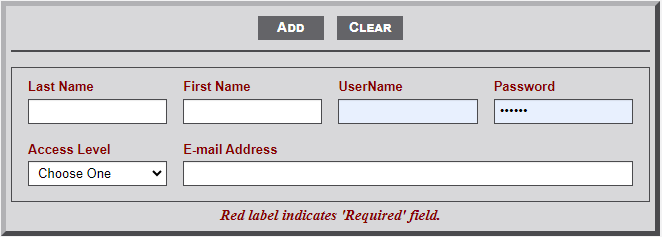
As noted in the image below there are multiple input areas. All are **required **fields.
[](https://wiki.txfannin.org/uploads/images/gallery/2024-09/users-form.png)
1. **Last Name** - Last name of the new *User*.
2. **First Name** - First name of the new *User*. Middle Initial optional.
3. **UserName** - Username for the new *User*. Ask new user for preference.
4. **Password** - Password for new User. *User* can change once they sign-in with this password.
5. **Access Level** - Two levels are available; **Admin** and **User**.
- **Admin** - This level provides access to all **Admin** modules.
- **Users** - This level provides access to a *subset* of the **Admin** modules. Users do not have access to the modules identified on the *dashboard* and modules included in the *Utilities* menu.
6. **E-mail Address** - E-mail Address of the new *User*.