# What's New
#### **Purpose**
On the website home/index page there is an area set aside for announcements, coming soon notices, and what's new information. The What's New Utility module is used to facilitate this action.
#### **Overview**
The information displayed in the What's New area on the home/index page is displayed in three different categories: Announcements, Coming Soon, and What's New. An information heading is displayed within each category for the specific subject. Multiple items in any one heading can be set. A start and stop date for each item must be set (i.e., I hate to see an announcement for an event on March 20 displayed on March 21).
#### **Usage**
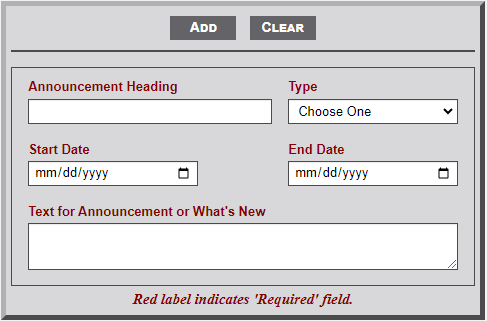
As shown in the image below, the **What's New** module includes five input fields for data to include in the '*whatsnew*' table. All are required fields
[](https://wiki.txfannin.org/uploads/images/gallery/2024-09/whats-new.png)
The **What's New** module includes 5 fields as follows:
1. **Announcement Heading** - Enter the text heading for the category.
2. **Type** - Select the type of What's New category: *Announcement*, *Coming Soon*, or *What's New*
3. **Start Date** - Use the calendar dropdown to select the start date of the category item.
4. **End Date** - Use the calendar dropdown to select the end date of the category item.
5. **Text for Announcement** - Enter the text for the category item.
####