Any Page Text Module
Purpose
The Any Page Text utility is used to enter unique text items for identified site pages. On any webpage there are various elements that are used to display 'static' text. Elements such as the page heading and text boxes used to describe something about the company or staff. Most often these are 'hard coded' into the HTML for the page. Given the nature of this GenWeb site it is better to have a mechanism where the County Coordinator can make changes to any page text without needing to change the basic HTML code. Thus, this module.
Overview
The general structure of a website page consist of a page heading, page introduction text, table introduction text, table, and image.
Usage
As noted in the image below there are three input items: Script Name, Script Id Name, and Script Id Text. All are required fields.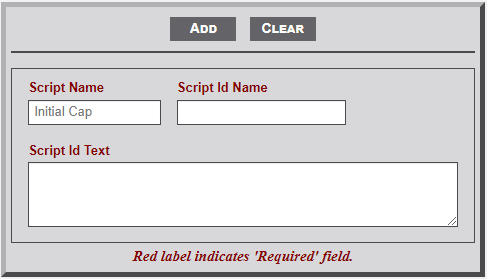
The Any Page Text module includes three elements as indicated below. All are required fields.
- Script Name - This field identifies the script/module that is to be the recipient of the text. For example if the text is intended for the main (index) page the entry in this field would be 'index'. Likewise for the cemetery page it would be 'cemetery'. Whatever name appears in the URL for the page would be entered in the field. BUT... note that the placeholder indicates Initial Cap. Thus, 'cemetery' would be 'Cemetery'.
- Script Id Name - Now comes the tricky part. Within an HTML page there exists elements that are identified by using an identifier tag (e.g., <div id="thisElement">). Given that the element is intended to be unique only one instance of the identifier can be used on a page. To determine the specific identifier for a page do the following steps.
- Open the page in the browser.
- Right click on an area of the page.
- Select View Page Source from the dropdown menu.
- Locate the desired element.
- Open the page in the browser.
- Script Id Text - HTML text to appear on the indicated page.
No Comments