Schools
Purpose
The Schools admin module is used to add, edit, or delete individual cemetery records in the schools table of the database.
Overview
The module contains multiple fields on the Basic Info and Text Info tabs for entering the desired information. See the Basic Module Structure page for detailed use of the buttons at the top, the form, and the table below the form.
Basic Info - Tab 1
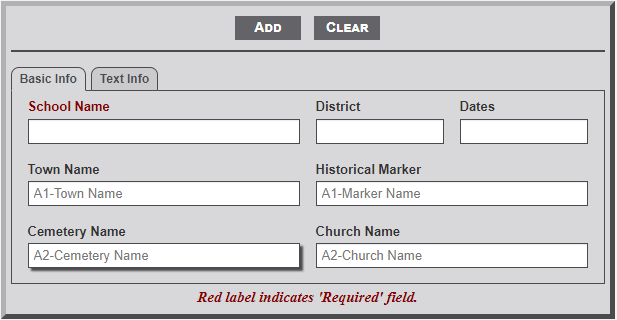
Input Fields
- School Name - Enter the name as it should appear on the individual school page. This is a required field.
- District - Enter the name of the district associated with the school.
- Dates - Enter the dates that the school existed (e.g., Jun 1893 - Dec 1902).
- Town Name - After entering one letter of the town name a dropdown menu will appear listing the town names that begin with the entered letters. Continue to type the name to further filter the selection list. Select the desired name from the list.
- Historical Marker - As with the Town Name, select the desired Marker name from the list.
- Cemetery Name - As with the Town Name, select the desired Marker name from the list.
- Church Name - As with the Town Name, select the desired Marker name from the list.
Text Info - Tab 2
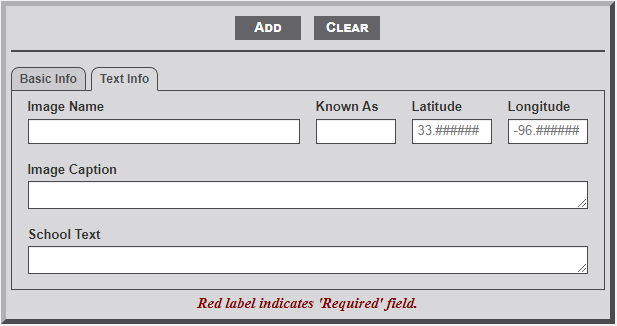
- Image Name - Enter the image name of the photo that will display on the individual school page. All school images must be located in the sch_images subfolder of the main images folder. Thus, only enter the image name and not the full path.
- Known As - This field is used to provide additional information about an association of the cemetery. Useful information would be contact name, email address, and/or mailing address. The text will appear in the shadow box to the right of the right of the cemetery image on the individual cemetery page.
- Latitude - If known, add the GPS latitude coordinate in this field. Note: the placeholder format for the entry. First two digits must be 33, followed by a period and six digits.
Note: If the Lat/Lon coordinates are entered the shadow box to the right of the cemetery image will display a small map showing the location with a link below the map to a Google map with the location. - Longitude - If known, add the GPS longitude coordinate in this field. Note: the placeholder format for the entry. First three digits must be -96, followed by a period and six digits.
- Image Caption - Enter the text for a caption that will display below the image of the school on the individual school page.
- School Text - This field is used to enter school related information that will display below the line on the individual school page. A short history of the school is most appropriate. HTML is allowed.
No Comments