Memorials Attribute
Purpose
This report creates a listing of memorial records that contains search string in the selected attribute field.
Report Form
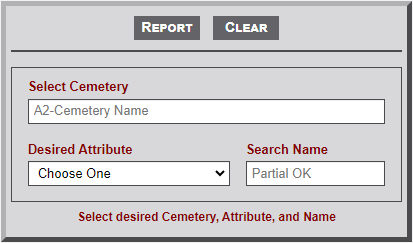
- As indicated on the form image below, enter the first two letters of a Select Cemetery input box. This will then display a list of cemetery names that begin with the entered letters. Continuing to enter letters with further filter the list. Select the desired cemetery. The name will then appear in the input box.
- Select the Desired Attribute from the dropdown list.
- Enter the string (e.g., Smith) in the Search Name field.
- Select the Report button to create the report.
Sample Output
The image below illustrates a sample output of the Attributes report. Only the records with the search string in the attribute field are included in the report. Note the following regarding the output.
- Records are initially sorted by the Individual names. User sorting is not available on this report. A report with more records will cause the table to include the alphabet bar and pagination buttons.
- Notice that the dates include a quote mark ( ' ) before the dates. This prevents the dates being changed by Excel when exported to a spreadsheet.

No Comments