Cemetery Military Info
Purpose
This report creates a listing of all records in the selected cemetery or all cemeteries identifying the tombstone inscriptions with photos with a military campaign and/or branch of service. This is useful to for providing to cemetery associations for placement of flags on graves for Memorial and/or Veterans Day.
Report Form
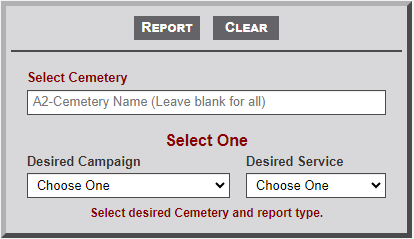
- As indicated on the form image below, enter the first two letters of a Cemetery Name in the input box. This will then display a list of cemetery names that begin with the entered letters. Continuing to enter letters with further filter the list. Select the desired cemetery. The name will then appear in the input box. As indicated in the Select Cemetery placeholder text, the field can be left vacant to run the report for All cemeteries.
- Select one option from either the Desired Campaign or Desired Service dropdown items.
- Finally, select the Report button to retrieve the cemetery records.
Sample Output
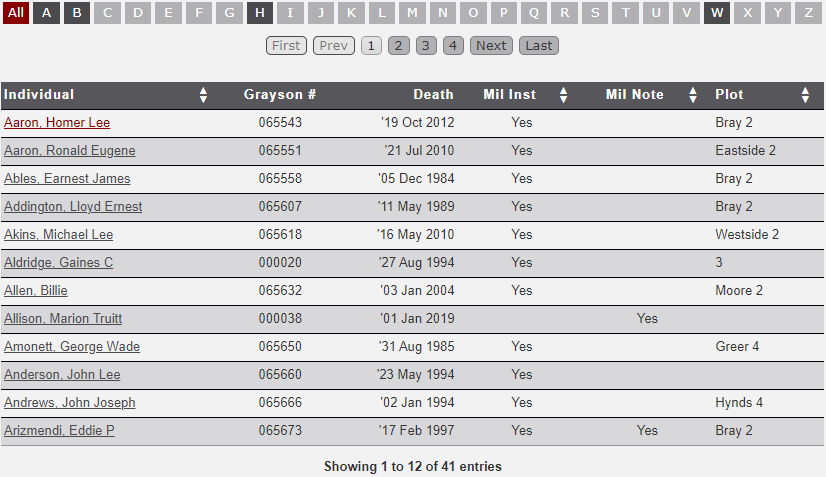
The image below illustrates a sample output of the Cemetery Military Info report. Only the records containing Military Campaign and/or Branch of Service information are included in the report. Note the following regarding the output.
- Records are initially sorted by Individual. Clicking on the column heading containing up/down triangles will sort the selected column. The initial sort will be in ascending order. Clicking the column heading a second time will change the sort to descending order. Clicking the column heading a third time will return the column to the original order.
- A future update will include buttons to export the records to the clipboard.
- Notice that the dates include a quote mark ( ' ) before the dates. This prevents the dates being changed by Excel when exported to a spreadsheet.
No Comments