Users - New
Purpose
The Users utility module is used to enter information for users who are allowed access to the Admin area.
Overview
The provided information will allow access to the website Admin are with the Access Level identified.
Usage
As noted in the image below there are multiple input areas. All are required fields.
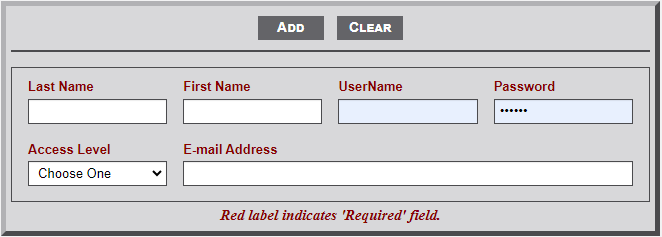
- Last Name - Last name of the new User.
- First Name - First name of the new User. Middle Initial optional.
- UserName - Username for the new User. Ask new user for preference.
- Password - Password for new User. User can change once they sign-in with this password.
- Access Level - Two levels are available; Admin and User.
- Admin - This level provides access to all Admin modules.
- Users - This level provides access to a subset of the Admin modules. Users do not have access to the modules identified on the dashboard and modules included in the Utilities menu.
- E-mail Address - E-mail Address of the new User.
No Comments