Articles
Purpose
The Articles module is used to update the records of the articles table of the database. As the name implies, the articles table contains those records used throughout the website that provide the real content to each of the areas of the site.
Overview
As detailed in the Basic Module Structure page, the user interface to the module consists of two parts. See that page for a fuller explanation of the structure.
- The articles Form displayed at the top of the page, and
- The Table containing the records in the articles table.
Form Usage
As observed in the image below, the Form Area consists of two tabs.
Basic Into Tab
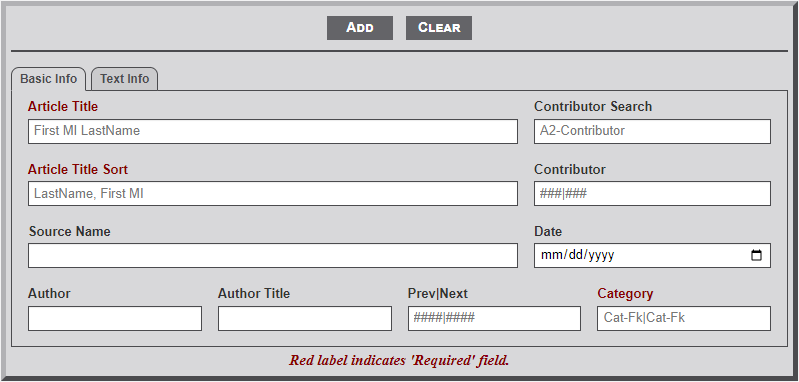
- Article Title – As the title implies this is the text to be used as the heading of the page. Thus, as in the example above… P. A. Ramsey & D. M. Ramsey. A total of 128 characters can be entered in the field.
- Article Title Sort – This field indicates the text of the content that should be used for the display in the list of content displayed for the user. In the case of an article for other than a person, the Article Title and Article Title Sort fields should be the same. But as the above example illustrates, when the article is about an individual, the Article Title Sort field should begin with the last name, for sorting purposes. This field can also contain 128 characters.
- Contributor Search – This is not a field of the articles table but a handy way to determine the key number of the contributor needed in the Contributor field below it. After entering two characters (that is the A2 hint in the text box) a dropdown list will appear containing the Contributor names that begin with the letters. Entering more letters will further filter the results. Also displayed in the dropdown is the Id number associated with the Contributor. Selecting an element in the dropdown list will display the information in the text area.
- Contributor – This is used to identify the contributor(s) that provided the information for the content of this record. The contributors are identified by their Id number from the contributor table of the database. Use the Contributor Search field above to find the needed key number. If the search for the contributor does not provide a number, continue entering the other information and Add/Edit the record. Then go to the Contributor Module and add the new contributor. Finally, return to this module, find the just added record (see table discussion below) and update the record with the contributor information. Note: to indicate more than one contributor enter the first contributor number, followed by the pipe {‘|’) character, then the second contributor number. The field can contain 128 characters so a lot of contributors can be included.
- Source Name – This field contains the source reference for the material of the article. Generally, a newspaper name or publication reference is used. The field can contain 128 characters.
- Date – This field contains the date of the publication or other related date. The date field uses an HTML widget in the format mm/dd/yyyy. Unfortunately, with the widget partial dates cannot be entered.
- Author – This field contains the name of the individual that authored the information from the publication. The field length is 64 characters.
- Author Title – The title of the author is entered in this field. Generally, something like Editor, Staff Writer, etc. is used. The field length is 64 characters.
- Prev|Next – This field provides the ability to link several articles together. Think of the articles as railroad cars in the railroad yard. Each car is unique but can be hooked together to form a train. Likewise, the articles are unique but can be linked together via this field to form a continuous chain of articles. It is all done by use of the article Id number. But two items are of importance. The identification of the first and last articles in the chain.
For example, maybe we have 3 articles that could be chained together ( 145 -> 914 -> 238 ) in that order. In article 145 the Prev|Next field would contain 0|914. In article 914 the Prev|Next would be 145|238. Article 145 being the previous article and 238 being the next article. In article 238 the Prev|Next would be 914|0. Article 914 being the previous article and 0 indicating no next article. If later you need to include a new article in the chain the Prev|Next field can be adjusted to accommodate the new article by adjusting the numbers accordingly. The two numbers in the field are used to display a Prev and Next button at the top of the article for the user. - Category – The category field is the heart of the entire website. It is used to determine which records are selected to display on the tables shown on the many areas of the site. The field consists of a basic 3-letter code to indicate the major area of importance. See the table in the Appendix for current codes and their meaning. In addition to the 3-letter code there may exist a subcode.
For example, the transportation area uses the 3-letter code ‘trs’ but also a subcode of ‘waterways’, ‘bridges’, ‘ferries’, etc. The subgroup is appended to the main group with a hyphen (e.g., trs-waterways). Multiple groups can be included by separating each one with a pipe (‘|’) character.
As stated above the 3-digit code is used to identify articles for listing on various pages of the website. But, in some cases it is not practical to list all the articles of a practical area. For example, in the Books on-site area there are many pages of a City Directory book, but for the main Books on-site page only the main page of the book with the table of contents should be in included in the list of books. Therefore, to not include a page in the main area list of articles, just prefix the category with an exclamation mark ( ! ) (e.g. !bok).
Another feature of the category field is linking articles to main entities (i.e., Cemeteries, Churches, Markers, Schools, and Towns) of the site. When an individual (e.g., Akers Cemetery) entity record is accessed the system searches the Contents table to gather those records that indicate an association with the entity. For example, an article detailing an event that happened in the town of Bells. Thus, a category with twn-008 (Bells Id) would be entered in the Category field. When the Bells town record is accessed, an accordion box will appear at the bottom of the town page with a link to the article. The same is true for the other major entity of the site. The field allows for 128 characters so multiple links can be provided (e.g., twn-008|chu-143|cem-014): links to a Town, Church, and Cemetery.
Finally, an article record can include a link to a memorial record by including a group as mem-nnnnnn, where nnnnnn is the memorial number. With such a group when the article is viewed the heading, which is usually an individuals name, will become a link to the memorial record.
Text Info Tab
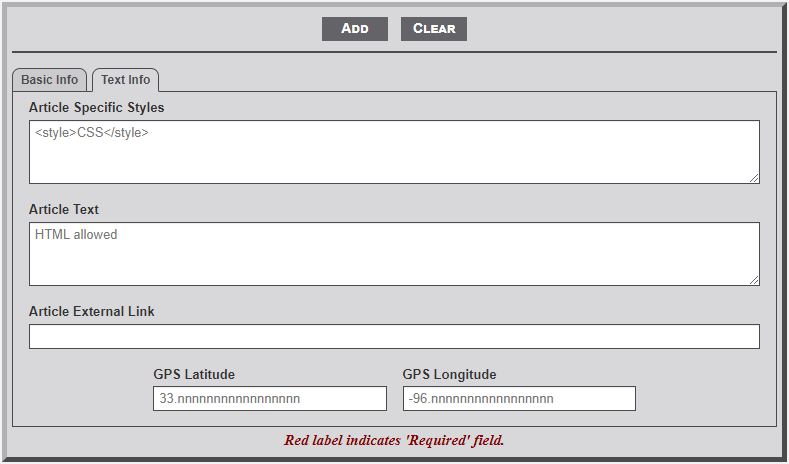
- Article Specific Styles – Sometimes it is necessary to provide additional CSS styling for a specific article. This field is used to do just that. As the field's placeholder identifies it is necessary to begin the CSS items with <style> and end the CSS string with </style>. It is important to ensure that the CSS code entered conforms to the structure and requirements of the CSS. Invalid CSS code will not be interpreted and thus not used. The CSS code entered will be appended to the beginning of the Article Text.
- Article Text – This field contains the content of the article. As indicated by the fields placeholder, full HTML coding is allowed and encouraged.
- Article External Link – Some articles are just links to external website. Copy the URL from the website and enter in the text area to facilitate the link. If the this link is used the Article Text box should be empty.
- GPS Latitude/Longitude – Frequently it is beneficial to include the GPS coordinates of an entity included in an article (i.e., the location of a business or home). If the coordinates are included, text is added to the bottom of the article with a link to a Google map identifying the item.
No Comments